Wholesale prices direct from the exporter

Complete Guide to the Netgear GS305-300PES Switch
A smart investment for your network
2/20/20254 min read
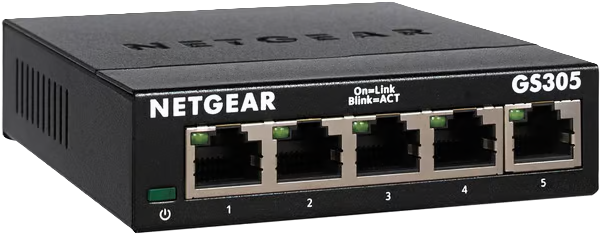
Switch Netgear GS305-300PES
The Netgear GS305-300PES switch is a networking device designed to optimise connectivity in environments that demand high efficiency and performance. With five 10/100/1000 ports, this switch enables data transmission at gigabit speeds, providing ample bandwidth that enhances communication between devices. This capability is particularly useful in scenarios where multiple devices, such as computers, printers and servers, need to be connected simultaneously.
One of the features that sets the GS305-300PES apart is its compatibility with different connection speeds, meaning it can connect devices operating at 10, 100 or 1000 Mbps. This flexibility is crucial in networks undergoing an upgrade, allowing older equipment to integrate into a modern infrastructure without the need for immediate replacement.
The concept of a gigabit connection refers to the switch’s ability to handle one billion bits of data per second, resulting in significantly faster file transfers and an improved overall network experience. Furthermore, using a managed switch such as the GS305-300PES offers distinct advantages over an unmanaged switch. Whilst unmanaged switches are plug-and-play, managed switches allow for more in-depth control over the network, including the ability to configure VLANs, monitor traffic and enforce security policies. Having this functionality can be a deciding factor for businesses seeking to maximise the efficiency of their network operations and ensure data security.
Benefits of the 5-Port 10/100/1000 Switch
The Netgear GS305-300PES switch, with its five ports supporting speeds of 10/100/1000 Mbps, offers a range of benefits that translate into significant improvements to the network infrastructure. One of the main advantages of this device is its ability to increase network speed, enabling faster data transfers between connected devices. This is essential in environments that require high data volumes, such as high-definition video streaming, online gaming and video conferencing.
Furthermore, the switch’s architecture allows multiple devices to be connected simultaneously without compromising network performance. In a modern home, for example, it is common for several devices, such as smartphones, laptops and games consoles, to be in use at the same time. The switch ensures that each of these devices receives the bandwidth required to function efficiently, preventing interruptions and latency that can impair the user experience.
These benefits are not limited to the home environment; in businesses, using a 5-port 10/100/1000 switch can optimise internal communication and productivity. Employees carrying out tasks that require high data traffic, such as video editing or transferring large files, will notice a significant difference in the smoothness of their daily operations. Furthermore, the switch’s simple setup and reliability contribute to a more efficient working environment that is less prone to connection failures.
Therefore, investing in a switch such as the Netgear GS305-300PES is a smart choice for both home users and businesses seeking to maximize their network performance and ensure an uninterrupted experience.
How to install and set up the Netgear GS305-300PES switch
Installing and configuring the Netgear GS305-300PES switch is a relatively straightforward process. To begin with, you should carefully unpack the switch and all the items included. It is crucial to ensure that all components are in perfect condition before installation. Check that the model meets your requirements and ensure you have a suitable location that is free from obstructions and well-ventilated.
Once unpacked, connect the switch to the power supply using the supplied adapter. Next, use Ethernet cables to connect the desired devices to the available ports on the switch. The GS305-300PES has five Ethernet ports that allow you to connect computers, printers and other equipment to your local network. Be sure to use good-quality network cables to ensure efficient data transfer.
Once the physical connections have been established, it is important to check that all devices are communicating with the switch. To do this, you can use the diagnostic tools built into your operating system or network monitoring software. Once you have ensured that the connection is stable, you can proceed with the basic configuration of the switch. This model is considered plug-and-play, which means it does not require complex configuration. However, it is advisable to access the device’s web interface to adjust settings such as bandwidth management and traffic prioritisation.
Finally, to optimise your network’s performance, it is recommended that you use network management software capable of monitoring the switch’s traffic and activities. This will help identify and resolve common issues during installation, such as latency or packet loss. Ensuring that all devices are properly configured will contribute to a more efficient home or business network, maximising the potential of the Netgear GS305-300PES switch.
Comparison with other Switch models
When reviewing the Netgear GS305-300PES switch, it is essential to compare it with other popular 5-port switch models available on the market. One of the models frequently compared is the TP-Link TL-SG105. Both switches offer a Plug and Play setup, which means quick and easy installation. However, the GS305-300PES stands out for its robustness, incorporating power management features that provide superior energy efficiency.
Another significant competitor is the D-Link DGS-105. Although the DGS-105 also supports Gigabit Ethernet technology, its build quality is slightly less robust compared to the Netgear. Customers frequently report on the durability of the GS305-300PES, which appears to be a decisive factor for businesses seeking long-term solutions for their networks.
In terms of price, the Netgear GS305-300PES switch is generally slightly more expensive than its direct competitors, such as TP-Link. However, this difference is often justified by the quality of the components and Netgear’s reputation for reliability. According to consumer reviews, the GS305-300PES is frequently rated as an excellent value-for-money option, particularly for environments requiring speed and capacity.
Efficiency is also a key factor. The GS305-300PES features Green Ethernet technology, which automatically reduces power consumption when ports are not in use. On the other hand, switches such as the D-Link DGS-105 lack similar features, resulting in higher energy consumption. This comprehensive review illustrates that, whilst there are alternatives on the market, the Netgear GS305-300PES switch is a solid choice for those seeking a balance between cost, efficiency and durability.
Amazon choices:
Unkited Kingdom
Portugal